Closing the Renewal Gap
Redesigning YouLend’s merchant dashboard so merchants could see how their repayments were tracking, helping more of them stay on track and renew.
Contents
- 01 —Context
- 02 —The Problem
- 03 —Research
- 04 —Strategy
- 05 —Testing
- 06 —Final design
- 07 —Handover
Context
Redesign YouLend’s merchant dashboard so funded merchants could see how their repayments were tracking, reconcile their payments without calling us, and renew when they were ready.
Turning a renewal problem into a design problem. Merchants who fell behind on repayments renewed far less often, and the information that could have kept them on track existed, but nowhere they could see it.
A tested, build-ready dashboard built around tracking, renewals and reconciliation, with engineering involved from the wireframe stage. My fixed-term contract ended before it went live, so I can’t speak to how it performed, but it was designed against an estimated £24m a year in additional funding.
The Problem
The renewal gap
Merchants who fell behind YouLend’s projected rate of repayment entered Collections, where our support teams contacted them to get back on track. Most were surprised to hear they were behind as although the specifics were in their original contract, they weren’t shown anywhere else. This experience was stressful for merchants, and expensive for us.
~20%
fewer renewals from merchants who had been in Collections
£24m
estimated annual funding from closing 80% of that gap, equal to £2.4m a year in gross revenue
Reconciliation
The second problem was smaller but constant. Merchants using the dashboard to reconcile payments, working out exactly where a ‘settlement’ amount had come from, struggled to find and understand the information, and called Customer Support instead.
Research
What merchants told us
Nicole (our PM) surveyed current dashboard users through Hotjar. They mostly visited to check their balance or review recent payments, and rated the dashboard 4.2/5 for ease of use, so it wasn’t broken, but it was missing the important jobs.
50%
wanted better options for renewing their funding, or viewing offers
27%
wanted better projections of how they were repaying over time
12%
wanted more clarity in the dashboard’s statements and graphs
What Customer Support told us
We listened to call recordings and spoke with a CS team lead. About 5% of calls were about the dashboard: reconciling payments, managing passwords and finding documents like contracts. All of that functionality already existed, but merchants couldn’t find or use it.
What the dashboard was doing

Select an advance, view balance, recent payments, payment performance and contracts

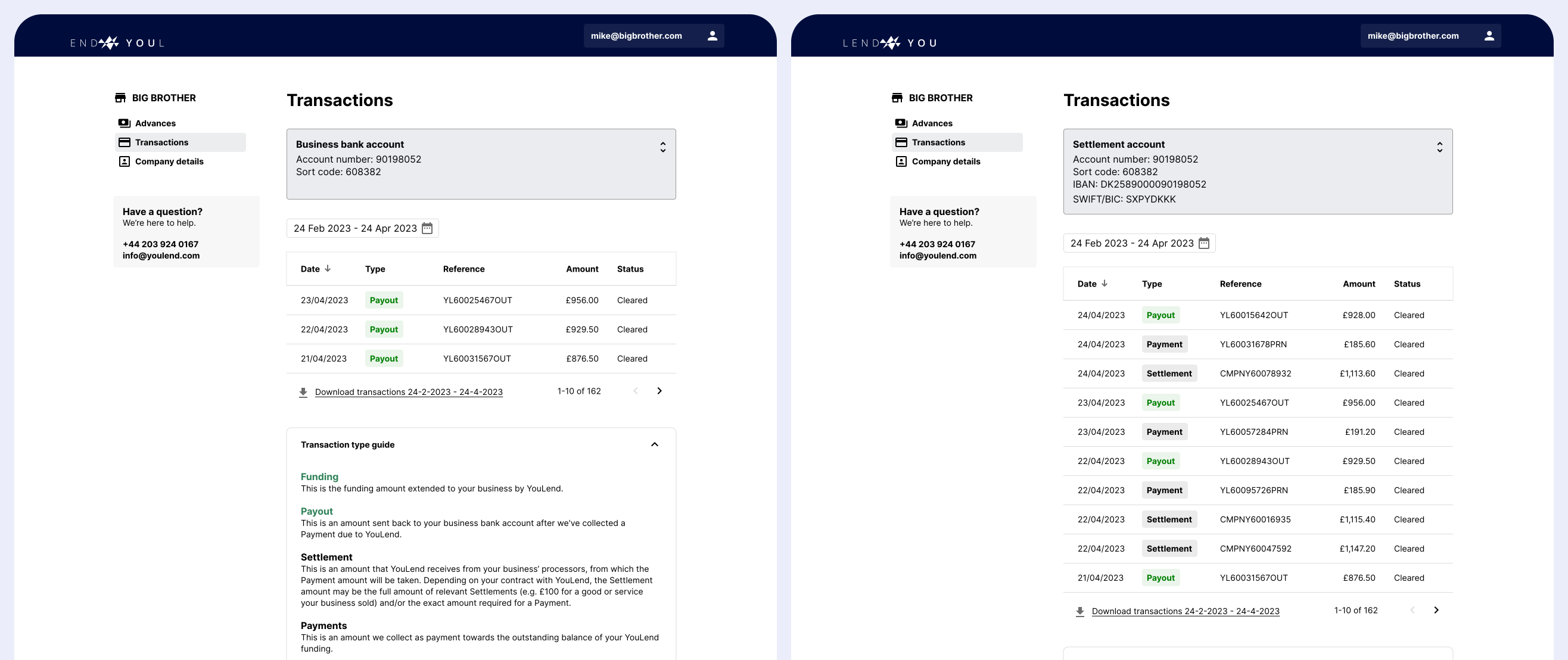
Reconcile individual transactions, download transaction data, see account details

Saved company and contact information

Apply for more funding once eligible, usually at 80% repaid
My review of the existing screens found the same pattern behind each problem: information was either missing or hidden.
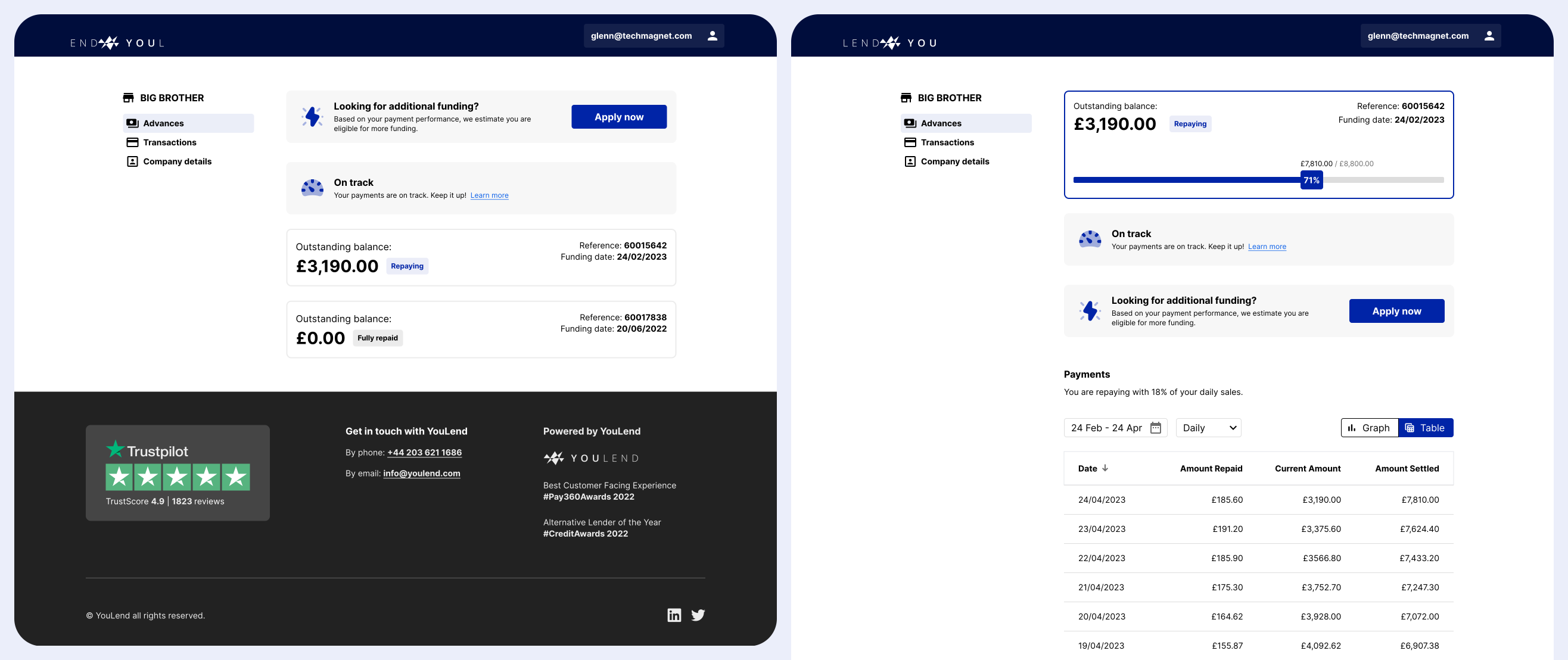
New merchants landed on Advance details; after renewing, they landed on an Overview ‘hub’ instead, with no warning. It saved one click for merchants who hadn’t renewed, but around 70% did anyway, so it wasn’t of much value.
The Payments graph defaulted to ‘all time’ in a 650px column, so it was too zoomed out to read. Most merchants switched straight to the table.
Neither screen showed the information merchants needed to avoid falling behind.
The most useful view sat behind an obscure dropdown on a page few people found, labelled in jargon that took over 120 words to explain.
Strategy
Visibility before renewal
The business wanted more renewals; the research showed merchants wanted to renew too - the underlying issue, then, was visibility. A merchant who could see how they were tracking could correct course before Collections, and a merchant who stayed out of Collections was far more likely to renew. So I made repayment visibility the dashboard’s first job, with renewals and reconciliation built around it.
Decisions that shaped the dashboard
I replaced the sidebar with a hub-and-spoke model: Overview at the centre, Advance details one click away, and Back to return. Every merchant saw the same structure from day one, so nobody had to relearn it after renewing, and it was simpler to build.
I moved payment terms and performance into the page header. Rather than remaining as small print in a contract, it became the first thing a merchant saw.
Eligible merchants saw a clear renewal banner, answering the most-requested improvement directly rather than leaving them to find the Renewals page.
I demoed the wireframes to the team’s tech leads, with Nicole providing product context. Engineering helped shape the direction before it was fixed rather than inheriting it.
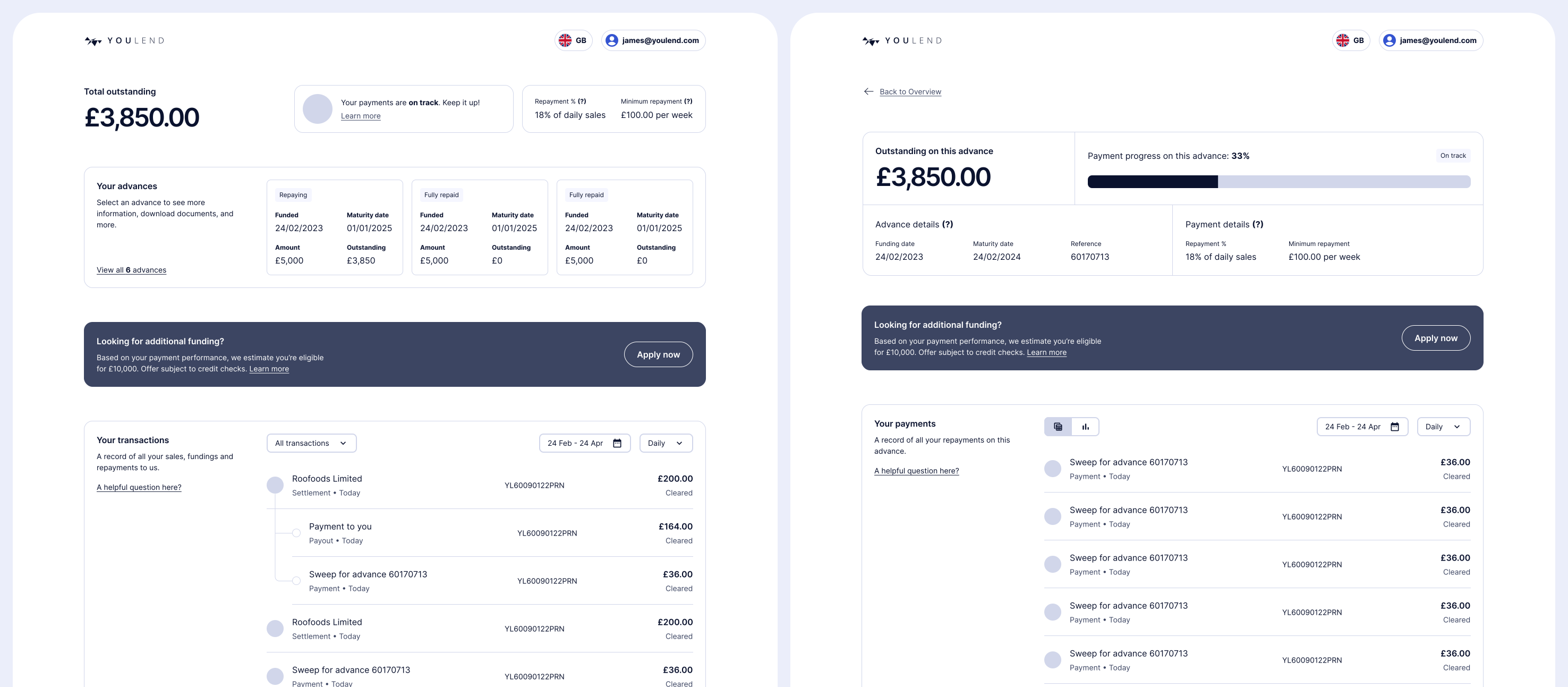
I also redesigned transactions as a timeline, closer to a banking app, removing the jargon and making the link between gross sale, repayment and settlement more visual.
Testing
Interviews
We spoke with six merchants who had logged in at least twice in the previous 30 days. What they told us matched the discovery work closely.

Mostly logging in to check outstanding balance, repayment percentage and daily repayment amounts

Occasionally exploring eligibility for new funding

Comparing gross sales and repayments with their own records or EPOS systems

Downloading data and agreements for VAT submissions and tax filings
They confirmed where the old dashboard fell short: ‘on track’ wasn’t enough without knowing how far ahead or behind they were; the breakdown of sales, repayments and settlements needed a download to see; and some merchants emailed their account manager rather than use the renewal flow at all.
Usability testing
I then gave participants a high-fidelity prototype and simple tasks: find your current balance, see how much you repaid on a given day, and find the contract for a specific advance.
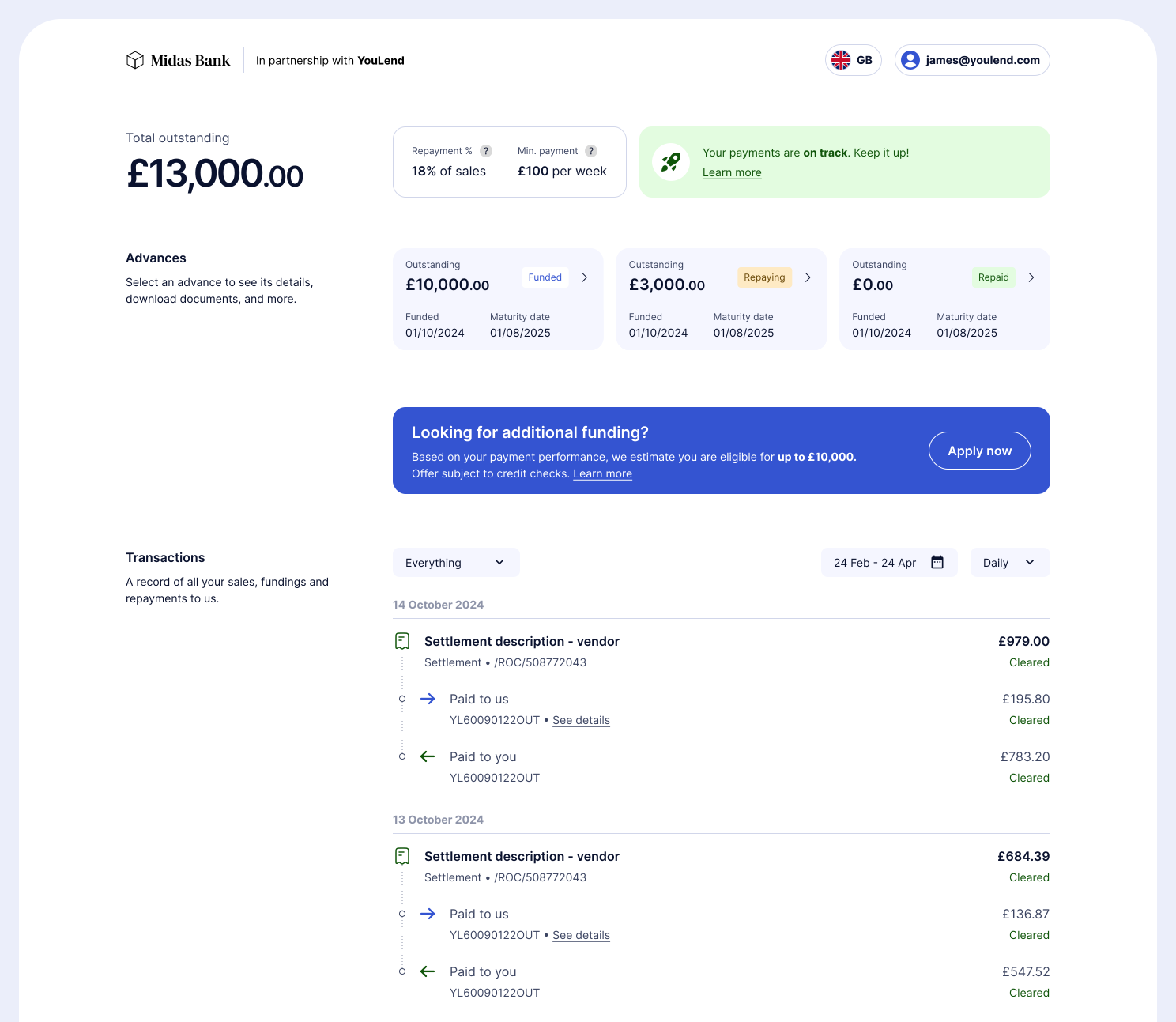
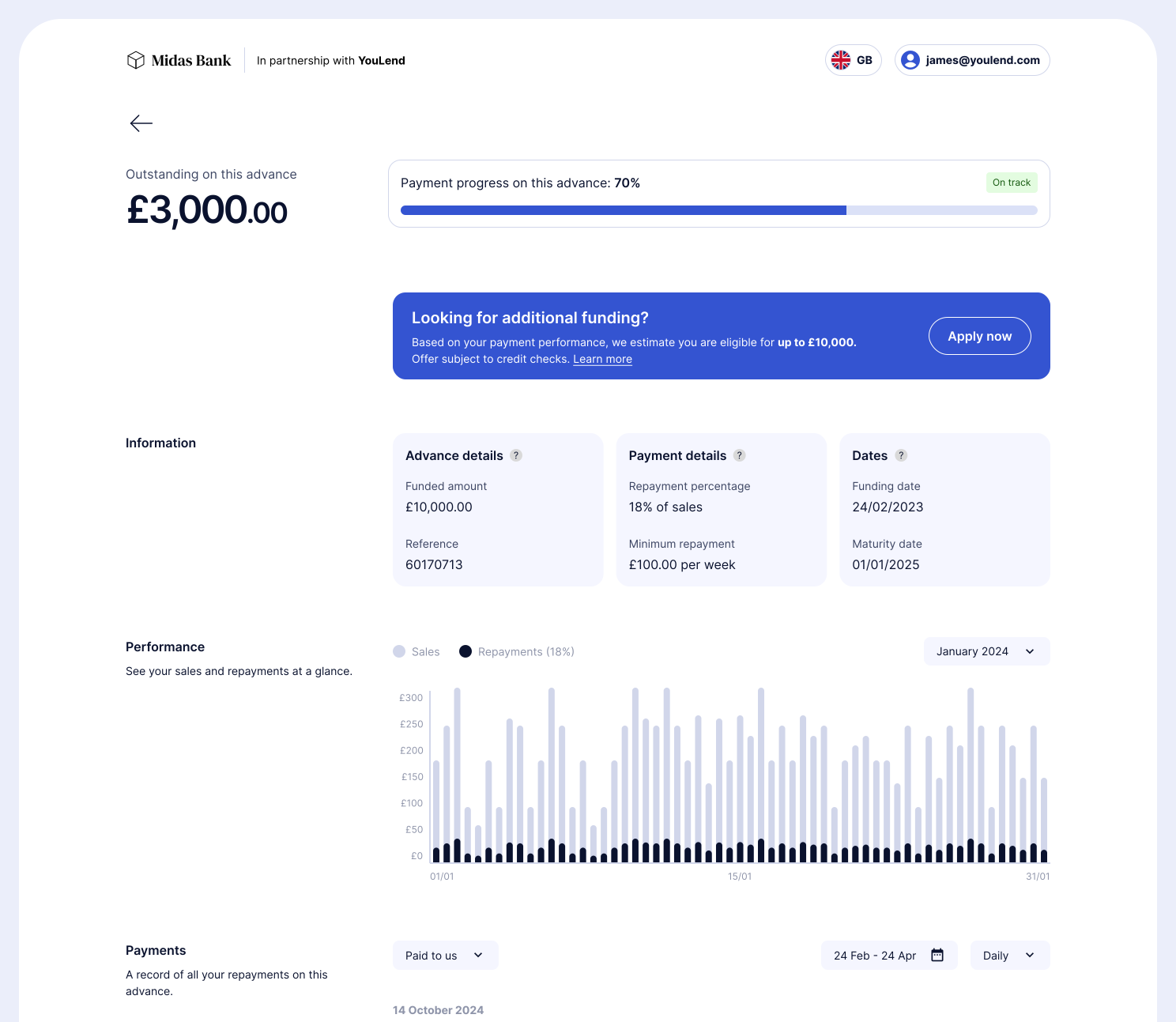
The consolidated layout and the clear breakdown of gross sales, repayments and settlements were well received, and the percentage repaid and projected payoff date resonated strongly.
Changing direction
The granular transaction timeline didn’t land. Merchants agreed it was clearer than before, but it didn’t match their main reason for logging in: a quick check on balance and recent sales. They wanted an aggregated view of the day or week, not a ton of detail upfront. So I moved the timeline behind a toggle, and made aggregated summaries the default.
Final design
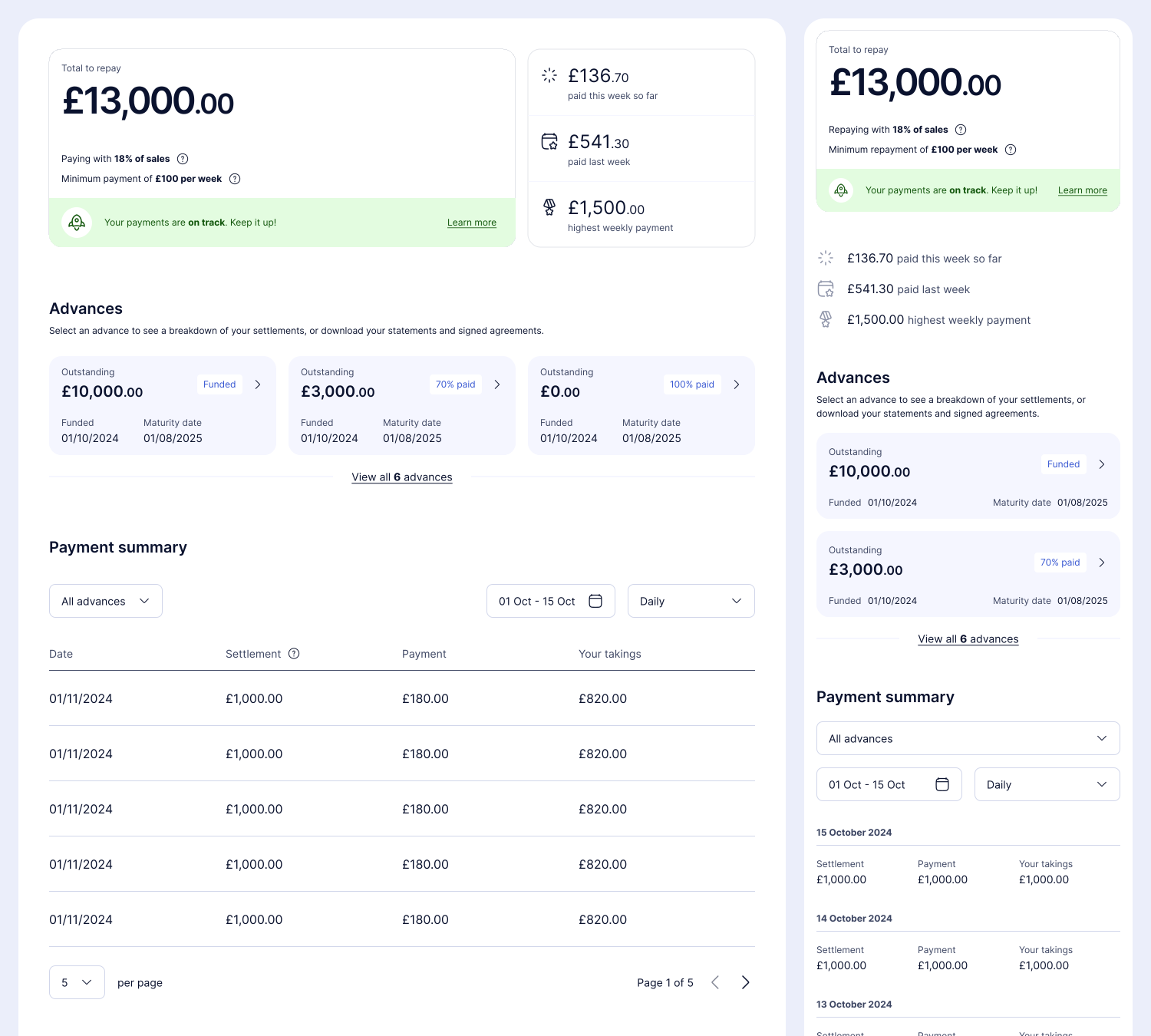
Overview
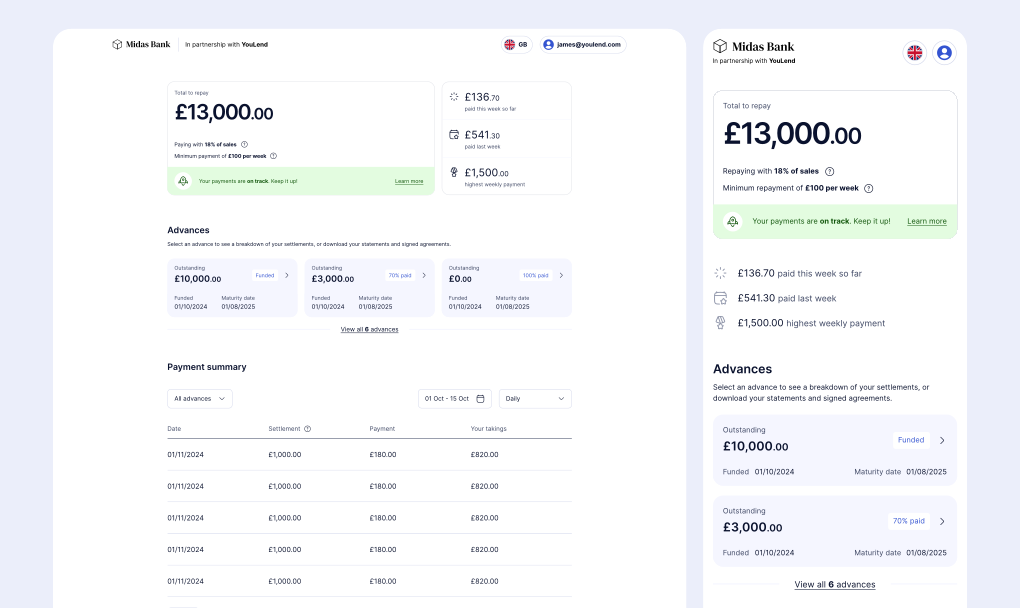
I brought everything into a single column to increase available space, and reintroduced tables for the summary views. ‘Motivational’ came up often in testing, so I added this week’s performance against last week and the best week to date near the top, alongside more detailed ahead/behind information.
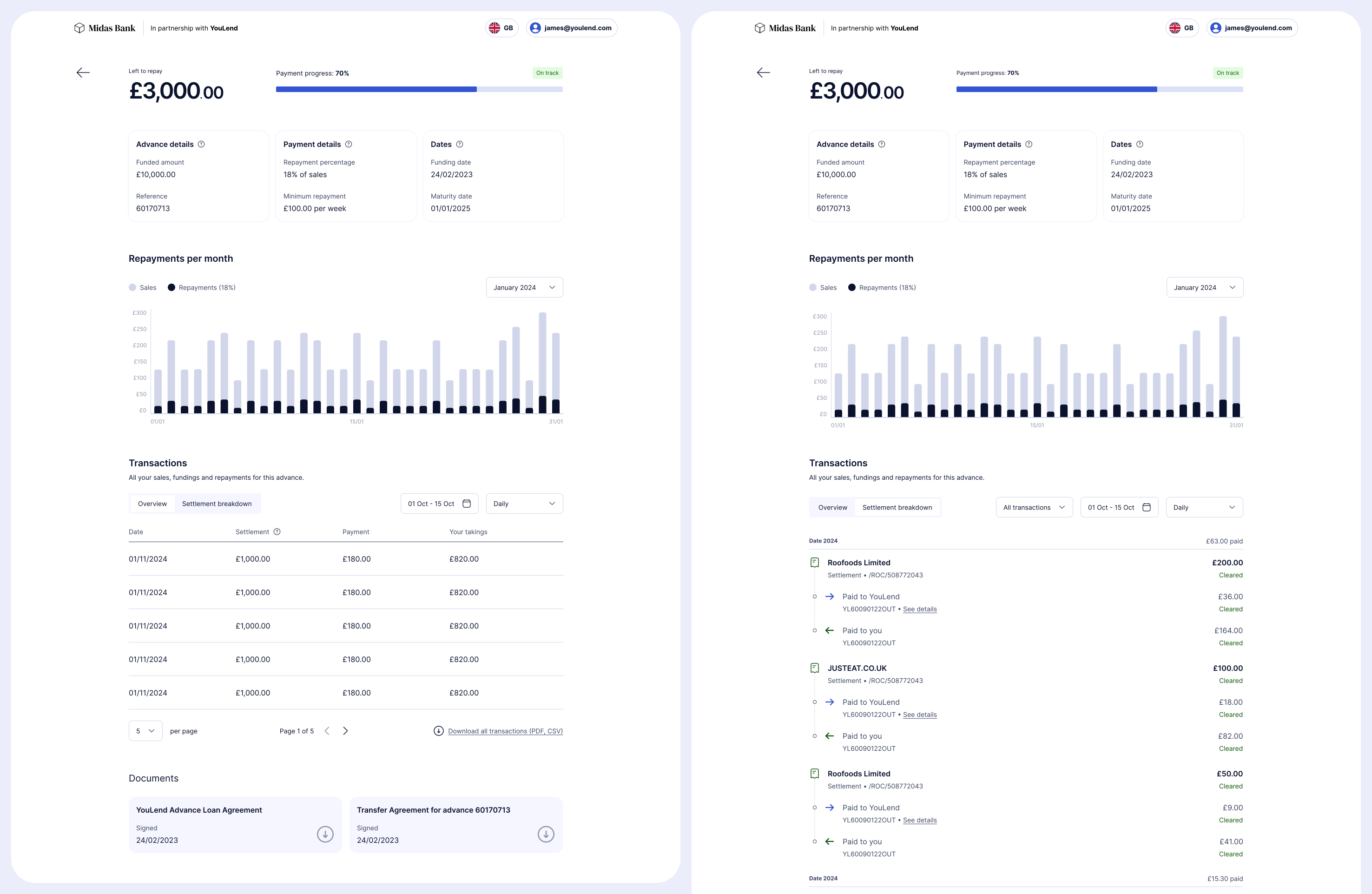
Advance details
Key information about the advance sits at the top, with a reworked graph and a transaction panel that switches between a summary and the detailed timeline.
Built for the product’s complexity
YouLend’s merchant cash advance varies a lot underneath the hood, and the framework had to hold all of it:
- Nine countries, each with its own rules, and six languages
- Different rules for limited companies and sole traders
- Three repayment methods: re-routing, Direct Debit (fixed or variable) and sales-based repayments, each shown in the same visual language
- Multiple settlement accounts for re-routing merchants, and multiple business bank accounts
- Repayments split across several lenders, broken down for regulatory reasons even though merchants rarely cared
Handover
By December 2024 the design was complete and tested. We were working with legal to confirm compliance, localised versions were scoped for every market, and build was planned for Q1 2025, with engineering already familiar with the direction.
My fixed-term contract ended before the dashboard went live, so I don’t have post-launch numbers. What I left was a tested framework aimed squarely at the renewal gap, and a clear line from a £24m commercial problem to the design decisions that addressed it.